Citing and referencing (and other support for coursework and NEAs)
Home › Forums › Inquiry and resource design › Citing and referencing (and other support for coursework and NEAs)
Tagged: Referencing
- This topic has 4 replies, 2 voices, and was last updated 5 months, 2 weeks ago by
 Jenny Toerien.
-
AuthorPosts
-
7th April 2026 at 3:23 pm #89808
One of the key areas where Librarians have been welcomed into curriculum subjects (usually for ‘one-off’ support lessons) is citing and referencing support, particularly for coursework. Indeed, some of Darryl’s early work on FOSIL developed out of the need to support IB Extended Essay students in this area, among others. Although our inquiry work is now much broader than just coursework support, this need still remains and my support for it is now strongly informed by my experience as EPQ and HPQ co-ordinator at my current school.
I used to centre the technical side of this on teaching students to use the in-build tools in MS Word. While reasonably good, there were a number of down sides with these. Some types of sources were not well supported (and not consistently supported across Mac and PC) and so required fiddly work-arounds, and the because the tools themselves only exist in the app, they do not work on iPad Pros or Chromebooks, which were becoming increasingly prevalent even when we left Oakham in September 2021. The range of referencing styles available is also narrower than some of the online tools, so isn’t the best preparation for university.
I have been meaning to shift to teaching an online citation manager for a while, but the barrier to entry was high because it meant redoing all the support materials that I have built up over many years, including this detailed LibGuide. This year I have taken the plunge and made a radical shift in my support for citing and referencing (across EPQ, HPQ and coursework), moving my teaching to Zotero (Zo-TER-o) and ZoteroBib, and I’m so glad that I did. The tools are relatively easy to use and provide a lot mor functionality than Word. They do require some teaching as the auto-generated references sometimes need quite a lot of tidying up – but this is easier for many students than starting from scratch.
In case it is helpful to anyone I have included the notes in the next post that I have put on our school coursework support Team for our teachers – along with an offer of support sessions to introduce students to the tools. I set up this Team earlier this year as a place for staff to ask questions and share good practice relating to coursework across all subjects.
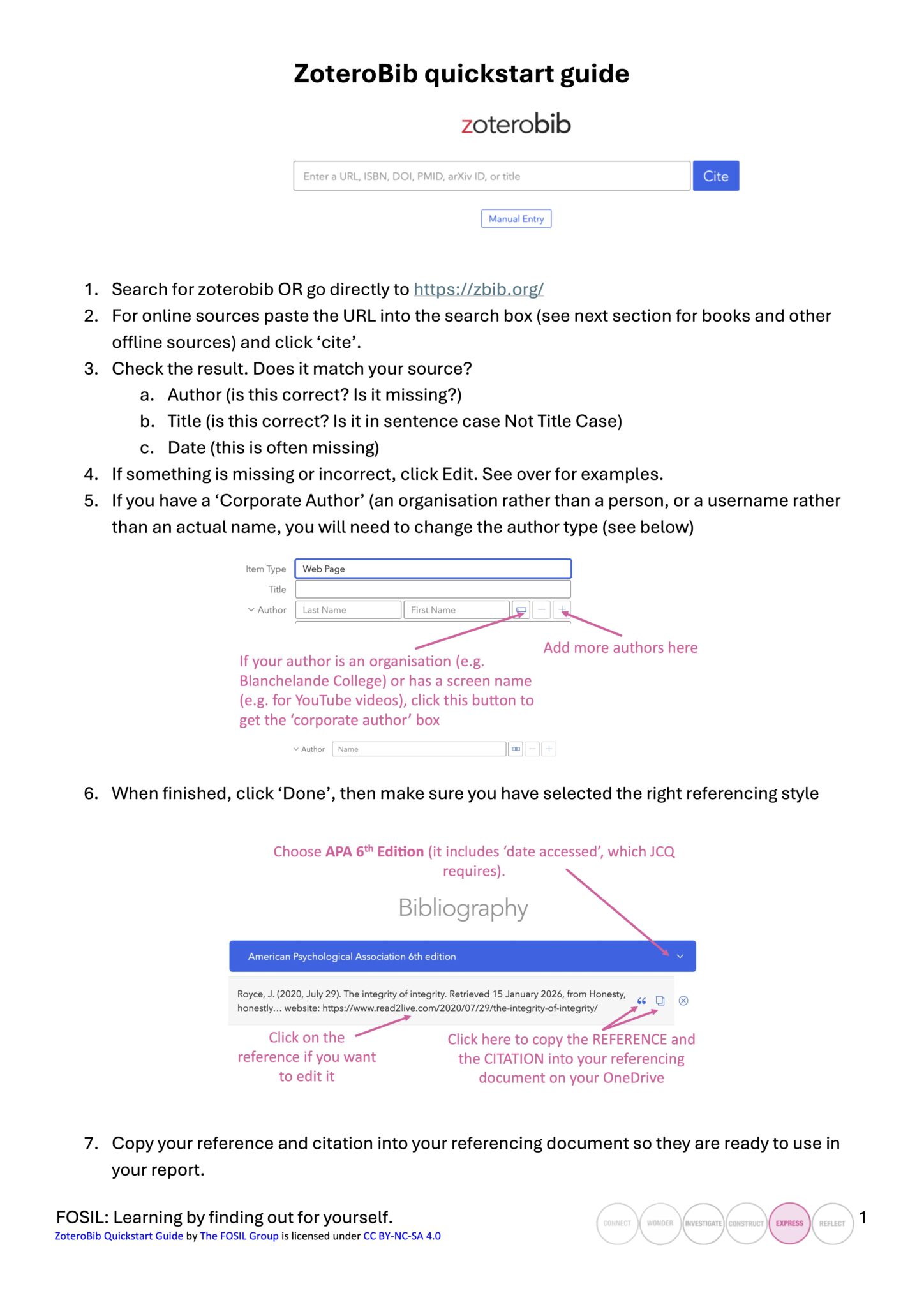
I have also added my ZoteroBib Quickstart Guide to the FOSIL Group resources – this also works with full Zotero (but I am intending to produce another guide for that later in the year).
 7th April 2026 at 3:26 pm #89809
[Post I made on our NEA and Coursework Team for teachers explaining the two tools]
Tool 1: ZoteroBib (short projects and small bibliographies)
- ZoteroBib is an online citation generator. I use ZoteroBib with my Y10 HPQ students. It is relatively quick to pick up and easy enough for GCSE students to use.
- You can paste a URL or ISBN into it, and it will have a go at generating the bibliography entry and in-text citation for you. It then allows you to edit/correct them. There is no need to create an account, and it does not save your results (although they are cached locally) so results should be copied out into a Word document.
- The quality of these auto-generated references is variable, and students need to be taught how to edit them. It is still a better start to the process than Word, which gives you nothing! Book references are often perfect but YouTube video references are usually poor, with other websites and news sources are somewhere in between. See Quickstart Guide for details.
Tool 2: Zotero (full version) (longer projects and larger bibliographies)
- Zotero is a citation manager. It is a steeper learning curve (but relatively easy for anyone who has already used ZoteroBib so that can be a good stepping stone). It is more useful for students with their own laptops because it works best with (free) software downloaded, so I use it with my Y12 EPQ students. It is open-source and compatible with virtually everything (Windows, Linux, MacOS, iOS, Android) and its plug-ins run with a wide variety of browsers. Students do need to create an account, but this is free, asks for fairly minimal information and is very easy.
- The two main advantages of the full version are:
- it allows you to store and organise all your references in different folders so that they are just there and ready to use when it is time to write.
- it has integrated word processor plug-ins for Word, LibreOffice and GoogleDocs that allow you to ‘cite as you write’ and auto-generate bibliographies in the same way that the Word tools do.
- it has browser plug-ins that allow you to save websites to Zotero at the click of a button. Students still need to check and edit them for accuracy (see Quickstart Guide).
- My support materials are still evolving and I plan to post more here later in the year.
Which citation style to choose?
To make life easier for all of our students and prevent confusion, I have recommended that our school sticks to just two citation styles.
- For most applications, I feel that an in-text style is the best option. I suggest American Psychological Association 6th Edition (you will need to go into “Other citation styles” and search for it). The reason I prefer this to 7th edition is that it still includes the “date accessed” for most websites. This is still currently a JCQ requirement (although they don’t seem to enforce it) so it helps us to stay within the rules. I’m really not a fan of MLA (the default) because in-text citations don’t include the publication date, which seems quite a fundamental part of the citation to me.
- If your exam board or moderator requires a footnote style (as is common in History) then I suggest Chicago Manual of Style 18th Edition (Notes and bibliography) but I don’t have strong feelings about this so let me know if you think we should choose a different one and I’ll update the advice. I strongly suggest that if you are recommending a footnote style you also recommend that students install the app and plug-ins as that will manage the complexities automatically for them of what to do if you reference the same source twice on the same page.
Note some interesting 2023 research by Mendeley into commonly used citation styles has APA way out at the front on 56% – it wasn’t a fair comparison for footnote styles though because they had only been released on the platform the previous month!
7th April 2026 at 3:40 pm #89810I chose Zotero because:
- it’s free (unlike EndNote)
- it’s open-source with integration for a wide range of devices/apps
- it had better reviews than Mendeley in the areas I was interested in (data privacy, citation accuracy and integration with Word – Mendeley comes out better if you are interested in higher storage limits and social collaboration/ recommendation functions). This was a very comprehensive review I found, and seemed to back up what I had seen elsewhere.
- it has two levels – the more basic ZoteroBib, which is just a citation generator ,and the more comprehensive Zotero, which is a citation manager. This allows me to use the same tool at different levels with different year groups.
It would be interesting to hear what others are using and why – and how you are getting on. I’m fairly early in my journey with these tools, but already feel we have made a huge leap forward from the Word tools (not least because I can now easily support footnote referencing, where I couldn’t before, and because Chromebook and iPad Pro users are not excluded).
14th April 2026 at 11:43 am #89901Hi Jenny,
I was so pleased to read this post, this is the tool I’d settled on for all the reasons you outline but was often irritated by what I thought must be my failings in getting less than perfect citations.
I really like the organisational power of the tool and I think this helps sell it to students going on to university because they can see how it will remain useful beyond school and therefore the relevance of the underlying skill.
Thank you for sharing your guide, as we are shifting from IBDP to A-levels this year and starting the EPQ I am re evaluating all my materials so this is extremely helpful.
14th April 2026 at 3:42 pm #89903Hi Ruth,
That’s really interesting to hear, having made that shift myself 5 years ago when we moved schools – although mine also involved becoming EPQ co-ordinator. I found the biggest difference for me was that with the IB EE we (as the Library) ran support lectures and workshops at a number of key points in the year (possibly four?), and in between students met with their supervisors to discuss the progress of their projects but there weren’t weekly lessons. For the EPQ there is supposed to be a 30-hour taught course underpinning the project. I believe some schools may deliver these in intermittent chunks the way our EE support was delivered, but I think most run a group teaching session every week (ours are an hour long and after school because the EPQ is an extra-curricular option) with some individual supervision meetings outside that where necessary. In larger schools these lessons may be delivered by supervisors to smaller supervision groups, with ‘experts’ invited in for particular sessions (e.g. the Librarian or someone from the marketing team). In our school I teach all of the taught course sessions (and my students also have supervisors, whom they meet with as and when required).
I have found this regular teaching and learning opportunity much more helpful than the info dump approach that is required when there is no regular lesson time, because I can step and scaffold students though the inquiry process, give them time for supervised practice of key skills and revisit important concepts at regular intervals. It has been a much more rewarding process because I can see the students growing as inquirers though it. I also really like the Production Log that is part of the EPQ assessment (they vary a bit between exam boards – ours is AQA) because it really pushes the students to engage with the inquiry process throughout.
One big difference for me here is that the EPQ is not compulsory, where the EE is a compulsory core component of the DP, which has positives and negatives. It does mean that my students have chosen to undertake a research project – I’m not needing to force them through it – but it also means that only some of the year group benefit from learning these key skills in this in-depth, immersive way (I do run a short, 6-week induction course for everyone).
I would love to keep in touch as your school makes the transition and see how you find it. The main EPQ/HPQ discussion is here if you do want to continue the EPQ/EE conversation there. I’ll continue to post any updates I have about referencing here though, as that has broader application.
-
AuthorPosts


- You must be logged in to reply to this topic.